
Features

LinkedIn and Sales Navigator extractionICP FinderCampaigns and sequencesAnalyticsLimits and safetyTeam

Solutions

SolopreneursReal estate agentsAgenciesSales teams

Resources

BlogLinkedIn limits 2026AffiliatesAboutPricing

Try free for 14 days

★★★★★ 45+ solopreneurs on board

Automated LinkedIn prospecting that won't break the bank.

Skip the expensive tools and keep what matters. Sow your connection requests and harvest sales without wearing yourself out.

No credit card requiredCancel anytime
Scroll to see how it works
The problem

Why should LinkedIn prospecting cost a fortune?

The tools out there charge between $50 and $150 a month. They take days to learn.

  • Sky-high prices
  • Steep learning curve
  • Too many features you'll never use
  • Complicated automations
  • Risks for your LinkedIn account
Step 1 · Get your farm ready

Install the extension, set your pace.

The Chrome extension connects your LinkedIn account. You set the delay between two actions and the hours when Sales Farmer can sow your requests.

It takes about five minutes.

Step 2 · Prepare your field

Pick who to reach.

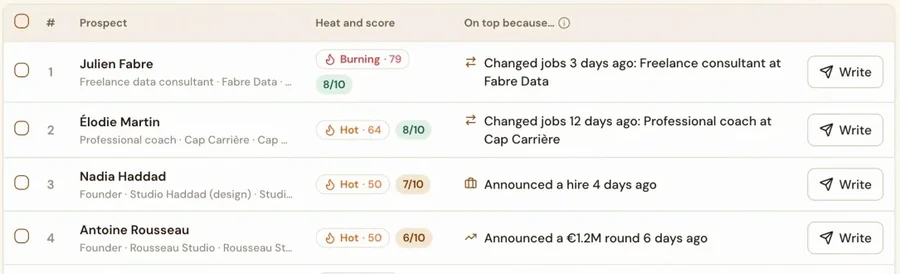
Run your search on LinkedIn or Sales Navigator, or describe your ideal customer to the ICP Finder and let it build the search for you. Sales Farmer then pulls every profile in one click.

You can keep only the people who were active on LinkedIn in the last 30 days, so your invitations go to people who will actually see them.

The sharper your target, the more replies you'll get.

Step 3 · Plant your seeds

Write your sequence, launch the campaign.

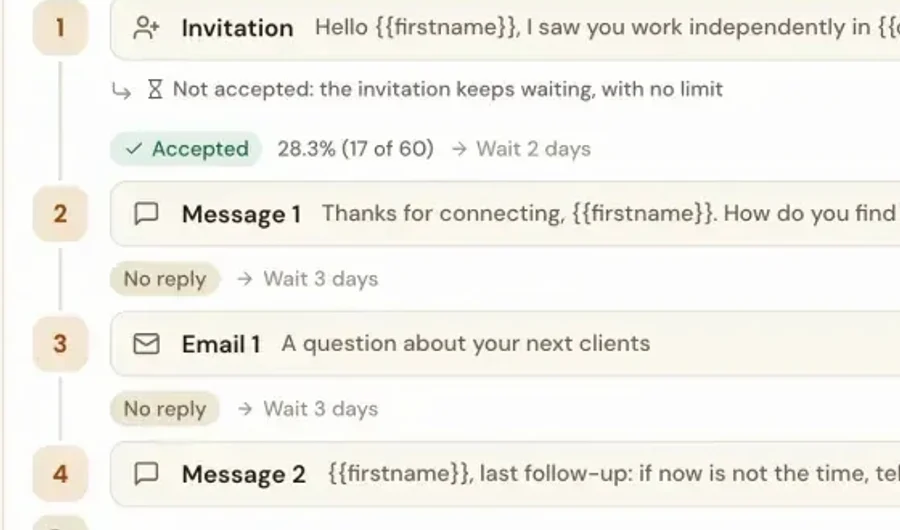
Personalize your message. Invitations then go out a few at a time each day, never in bursts.

0invitations sent on a typical campaign
Step 3 · Follow up

Follow-ups go out on their own, no spam.

Every accepted invitation triggers your message, then the follow-ups you planned, with natural delays. Everything stops as soon as the person replies.

0invitations accepted out of those 160
Step 4 · Harvest your sales

Sales Farmer sows, you harvest the customers.

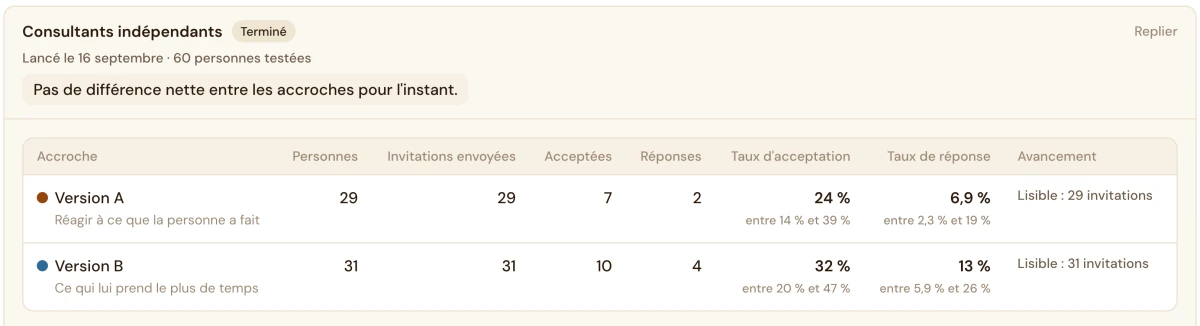
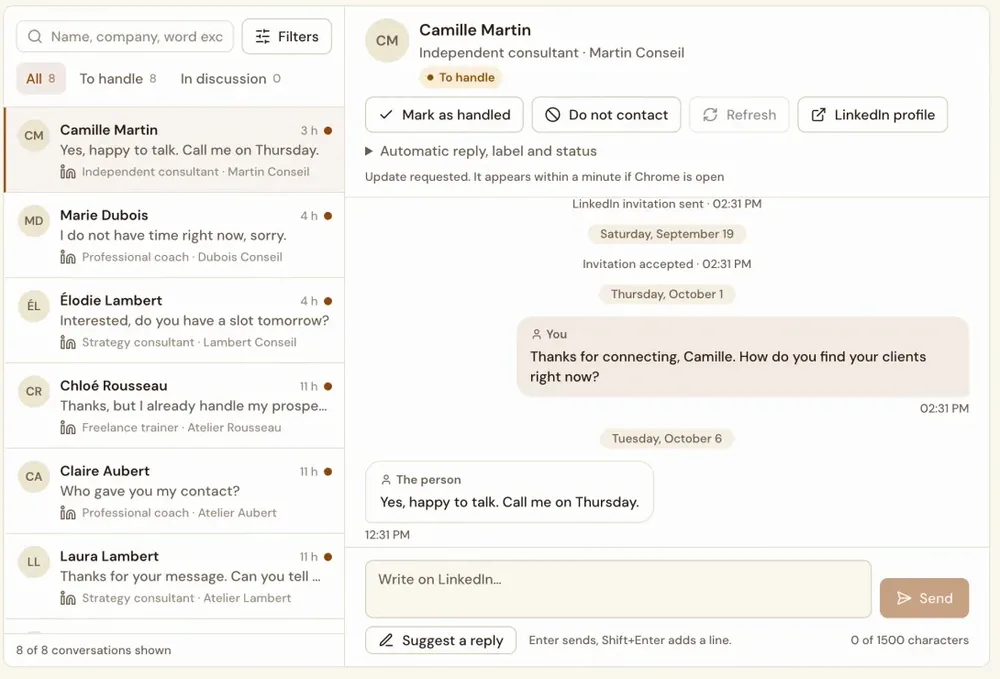
Track your acceptance and reply rates. The conversations stay yours.

0people who replied to you

Rates from a demo campaign. Yours will depend on your target and your messages.

The investment

$15 a month, 70% less than the rest.

Unlimited extraction, campaigns and messages, plus ICP Finder and support. Cancel anytime.

Roughly what you pay for Netflix, for prospecting that runs all month long.

45+ solopreneurs on board★★★★★ $15 a month, all included ⏱Ready in 5 minutes ✓14-day trial, no credit card ↺Cancel anytime
Live from the farm

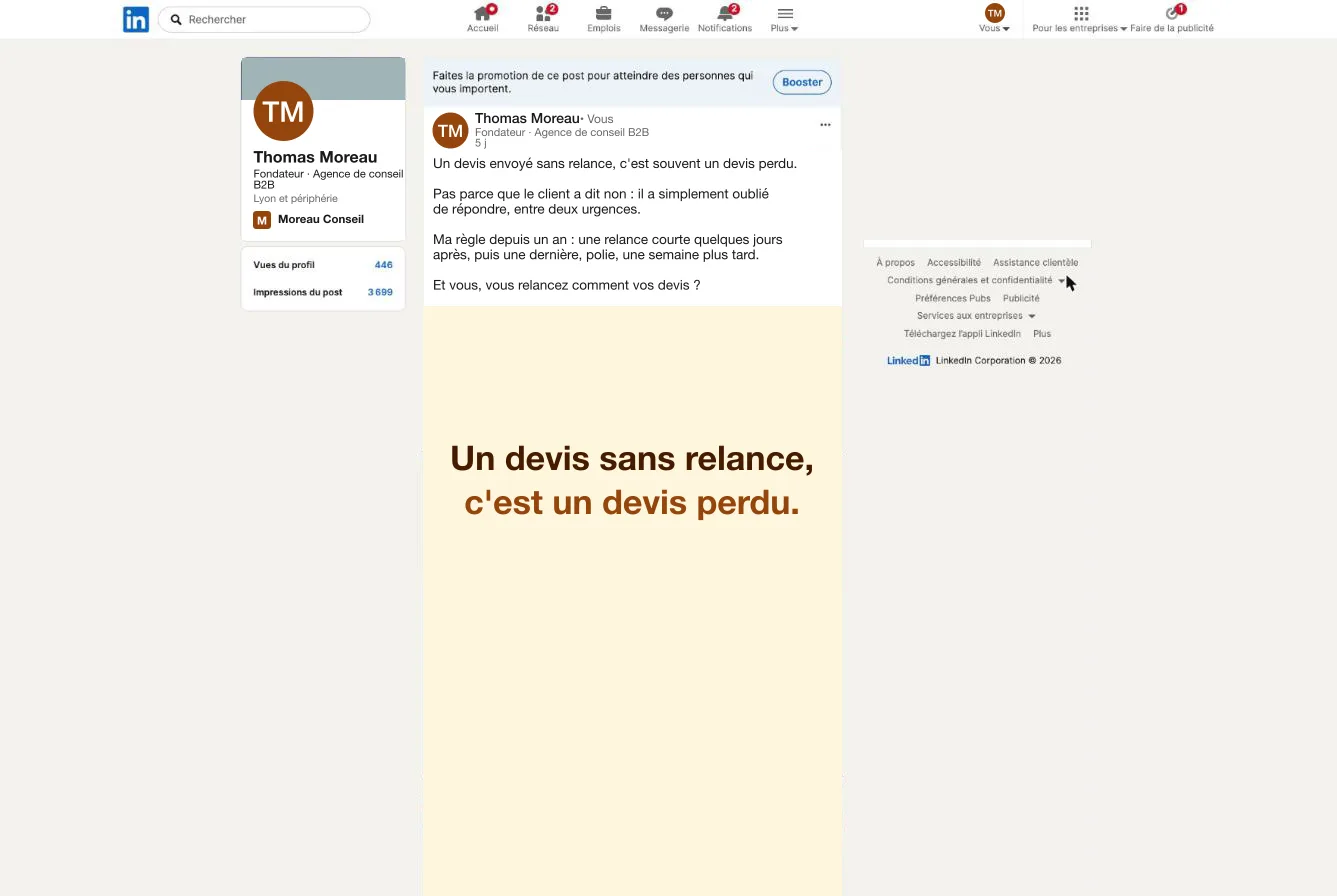
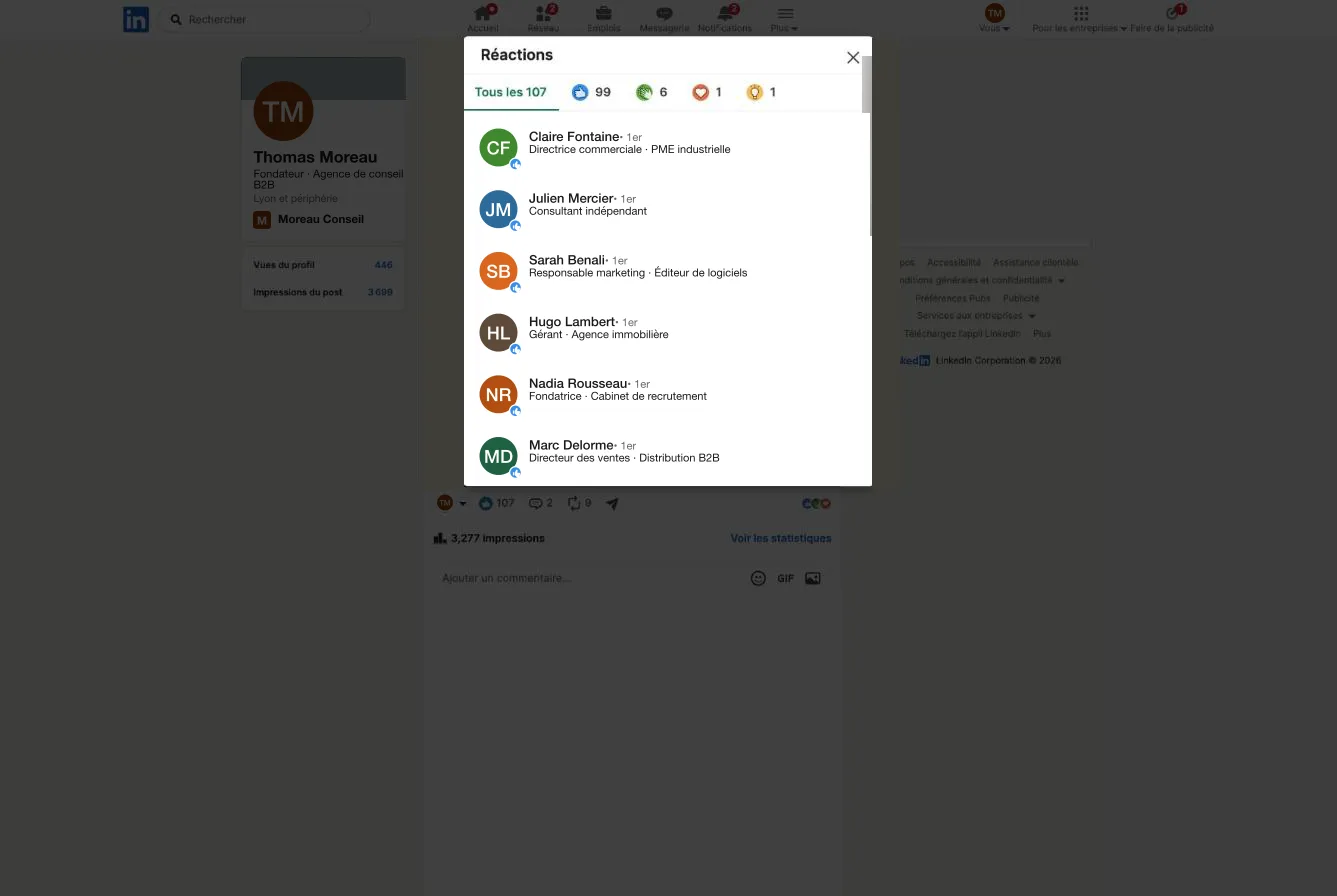
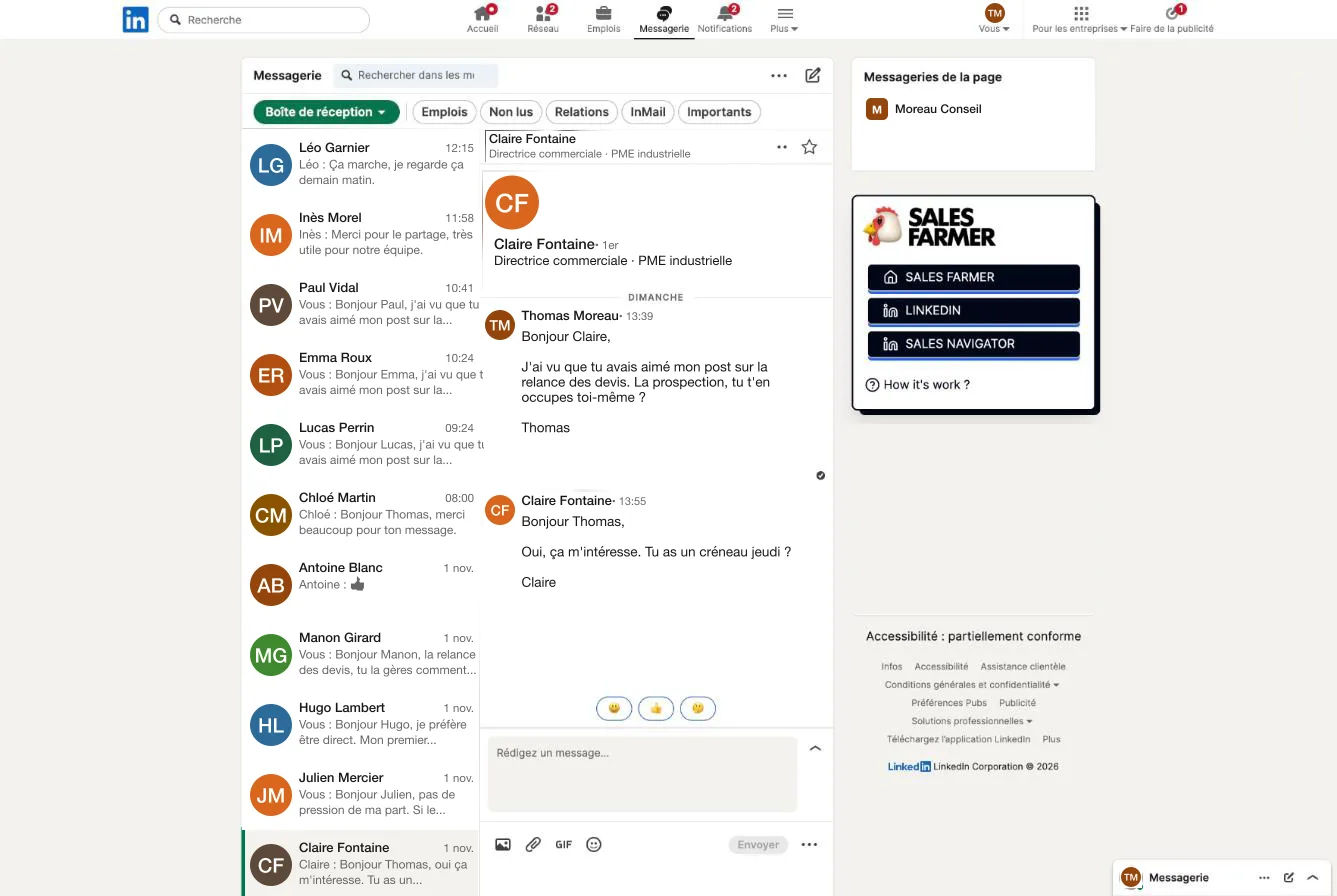
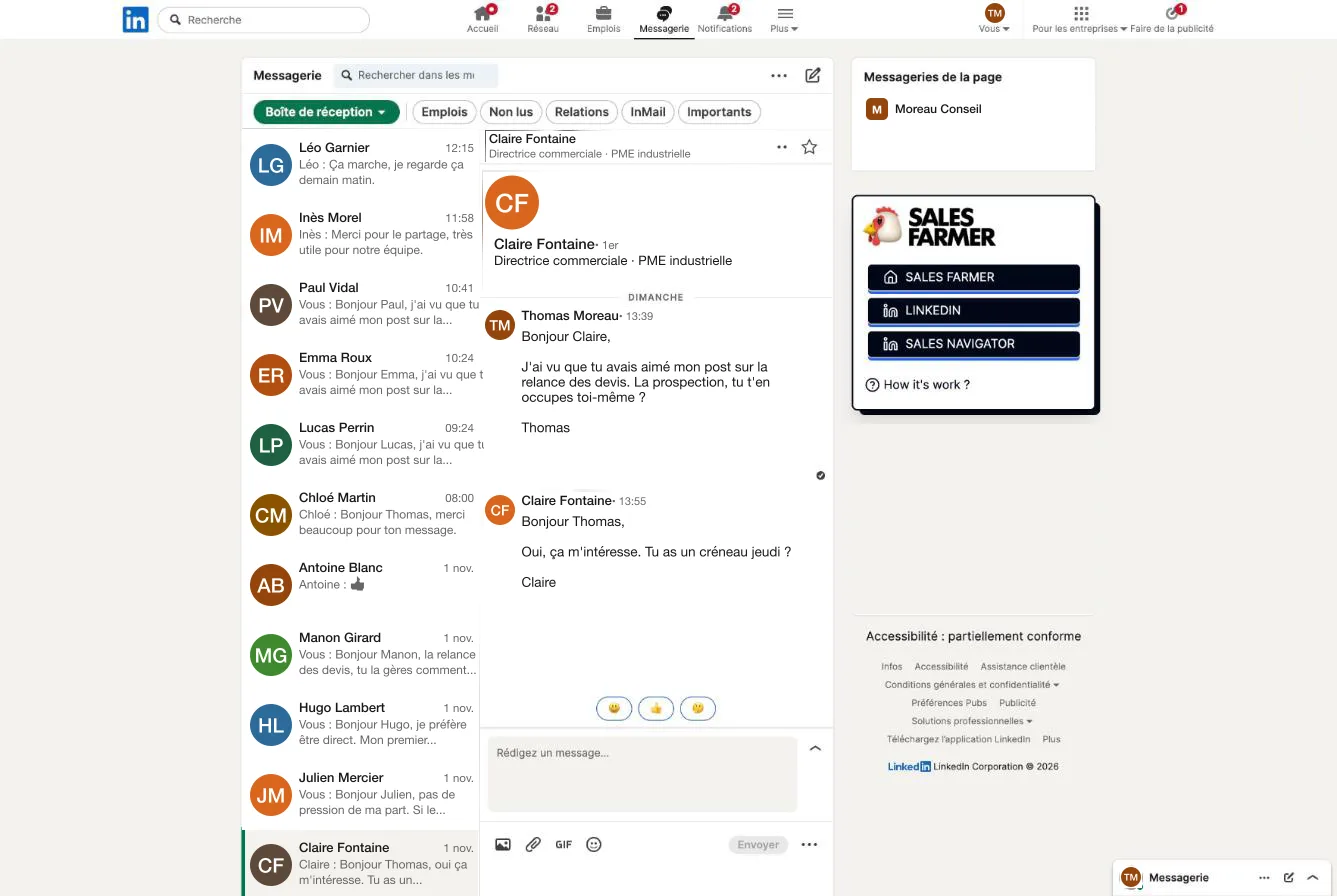
Here's what your campaigns look like.

Screens from the app, on demo campaigns.

The investment

The LinkedIn prospecting tool that costs the least.

No contract, no surprises, just qualified prospects on LinkedIn. Roughly what you pay for Netflix.

Starter

Everything you need to bring in sales.

$15a month, all included
Save $50 a month on average
  • Unlimited extraction from LinkedIn and Sales Navigator
  • Filter for profiles active on LinkedIn in the last 30 days
  • Unlimited, personalized campaigns
  • ICP Finder: your ideal customer in 3 steps
  • Unlimited personalized messages
  • Campaign tracking and performance analytics
  • Customer support by email and chat
  • Cancel anytime
Prospect free for 14 days
No credit card requiredCancel anytime

Team

For several sales reps, on a single invoice.

$19per seat per month
  • Several LinkedIn accounts, one team
  • Manage all team accounts in one place
  • One invoice for the whole team
  • Everything in the Starter plan

Create your account, then pick Team from your dashboard.

Set up my team
FAQ

Got questions? We've got answers.

Anything else? Email us at [email protected]

About

Good prospecting shouldn't be a luxury.

A farmer works the field with the right tools. Business owners need tools just as simple and affordable to grow. That's where Sales Farmer comes from: a no-frills tool at a fair price, built for solopreneurs, freelancers and small businesses.

Our story

Home›Features›Extraction
Lead extraction

Your LinkedIn searches, turned into a campaign in one click.

The extension adds a button to your LinkedIn and Sales Navigator searches. Profiles go straight into the campaign you pick, with their name, company and job title.

From LinkedIn or Sales Navigator

A regular search is enough. If you already have Sales Navigator, its filters let you go narrower.

From a CSV or by hand

Already have a list? Import it as a CSV, or add a profile you know.

Active profiles only

The "Active on LinkedIn in the last 30 days" filter drops dormant accounts. Your invites go to people who will actually see them.

From a post

People who react to or comment on a post are often your warmest leads. The extension grabs them too.

The lead list

Every lead, at its own stage.

  • First name, last name, company, titleEditable, and exportable to CSV whenever you want.
  • Where each lead standsInvited, accepted, message sent, reply received: one icon per stage.
  • Add leads along the wayA running campaign still takes new leads.
Good to know. Extraction only sees what LinkedIn lets you see. A profile outside your network may show up without a full name, depending on your account type.
Home›Features›ICP Finder
ICP Finder

Describe your business, get your leads.

Not sure which filters to pick? Tell us who you are and what you sell. ICP Finder works out the job title to target, runs the search and sets up the campaign.

Three steps

From a description to a campaign.

1

What do you do?

Sales rep, real estate agent, founder, recruiter, marketer. Your pick shapes the messages we suggest.

2

Describe your business

A few sentences will do, like "I build websites for law firms."

3

Your lead list

Check the profiles you want to keep, export them to CSV or open the campaign that's already set up. Profiles with no activity in 30 days are hidden.

What ICP Finder won't do. It can't guess your market for you. The sharper your description, the better the list. A vague sentence gets you a vague list.
Home›Features›Campaigns and sequences
Campaigns and sequences

A sequence that does the work and knows when to stop.

An invite, a first message, then your follow-ups, spaced out the way you choose. The moment a lead replies, they leave the sequence.

The invite

With or without a note. Invites without a note get accepted about 10% more often, and adding a note requires LinkedIn Premium.

The message and follow-ups

One message after they accept, then as many follow-ups as you like, each with its own delay.

The delays

In minutes, hours or days after the last action. Acceptance is checked every 8 hours.

In the app

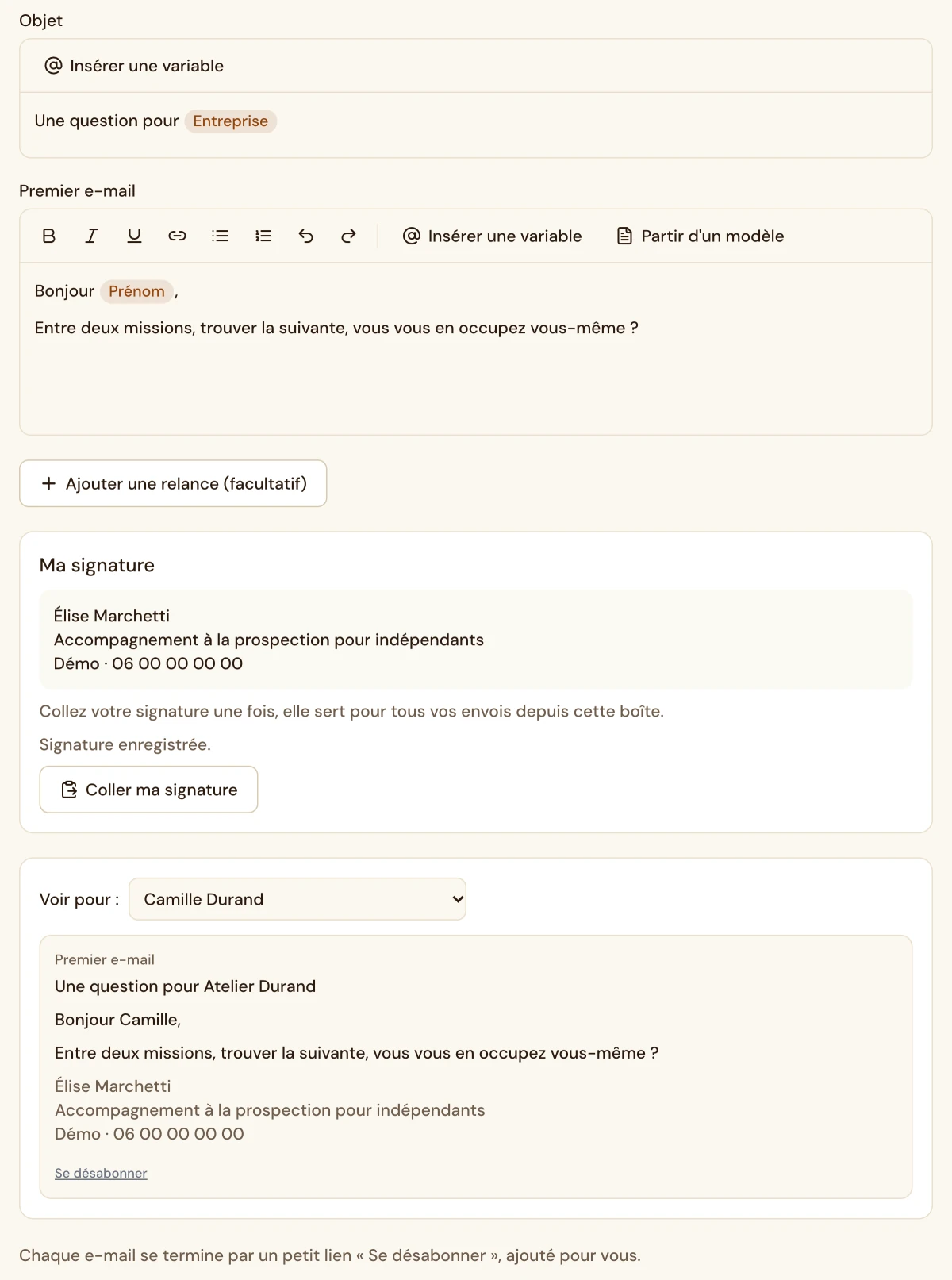
The sequence and the message, exactly as you'll see them.

Message editor with first name, last name and company variables
Real screenshot from the app
Your campaigns

Draft, active, paused.

  • Templates for your line of workInvite, first message, follow-ups: a starting point you rewrite in your own voice.
  • Pause and resumePause a campaign while you're on vacation, pick it back up when you return.
  • Copy what worksDuplicate the sequence, the lead list or both to test a variation.
Simple on purpose. No conditional branches, no ten-level scenarios. The one automatic rule is the one that matters: you never follow up with someone who already replied.
Home›Features›Analytics
Analytics

See what sprouted and what's still in the ground.

Two numbers per campaign: how many accept, how many reply. Enough to compare two messages or two audiences without a spreadsheet.

Acceptance rate

Invites accepted out of invites sent. It tells you how good your targeting is.

Reply rate

Replies out of total leads. It tells you how good your message is.

The people behind the numbers

Click a number to see who accepted and who replied, with their LinkedIn profile.

Campaign breakdown: invite, messages 1, 2 and 3 with their rates
Real screenshot from the app
A useful benchmark. The large 2026 studies put average acceptance between 20 and 30%, and replies around 10%. A small, well-targeted list often beats a big one. The details are in our article on LinkedIn rates.
Home›Features›Limits and safety
Your LinkedIn account

You set the pace. The tool sticks to it.

The extension works in your browser, with your own LinkedIn session, as if you were the one clicking. No server logs in on your behalf.

Invites per day

From 0 to 120. We recommend 40, and fewer for a new account.

Messages per day

From 0 to 120. We recommend 50.

Time slots

One slot for each day of the week. The default is 8 am to 6 pm.

Delay between tasks

From 1 to 10 minutes. We recommend 2 minutes.

Let's be straight. No automation tool makes an account untouchable, so be wary of any that promise it. LinkedIn mostly restricts accounts that send lots of invites nobody accepts. Tight targeting protects you as much as a low cap does.
Home›Features›Team
Team

Your whole team on the same tool, one invoice.

Buy seats, add your reps by email. Each one connects their own LinkedIn account and runs their own campaigns.

$19 per seat

Per month, or $189 per seat per year.

Central management

Add or remove someone in a minute. Freed-up seats can be reassigned.

Everything in Starter

Extraction, ICP Finder, sequences and analytics for every member.

Home›Chrome extension
Chrome extension

The farm's tractor, right in your browser.

The extension connects the app to LinkedIn. It runs your campaign tasks during your time slots, with your own session, and adds extraction buttons to LinkedIn.

What it does

Four chores, done the same way every time.

Run your tasks

It picks up the invites and messages waiting to go out, and sends them from your account.

Stick to your time slots

Outside your hours, it does nothing. It picks up again at the next slot.

Extract profiles

A button on LinkedIn searches, Sales Navigator and posts.

Search for ICP Finder

It runs the search ICP Finder built from your description.

On LinkedIn

A button right where you already search.

  • People searchThe results on the page go into the campaign you pick.
  • Sales NavigatorSame clicks, with Sales Navigator's advanced filters.
  • Reactions and commentsPeople who engaged with a post become leads.
Questions

The extension, in plain terms.

Does my computer need to stay on?

Yes. Tasks go out when Chrome is open and you're logged in to LinkedIn. If your computer is off, the campaign waits and picks up at the next slot.

Do my LinkedIn credentials go through your servers?

No. The extension uses the session already open in your browser. You never give us your LinkedIn password.

Does it work in other browsers?

The extension is built for Chrome. Chromium-based browsers usually accept it, but we can't guarantee it.

Can I use it without a running campaign?

Yes, to extract profiles and build a list. It sends nothing until a campaign is launched.

Home›Solutions›Solopreneurs
For solopreneurs

Prospect without giving up your billable days.

You do everything yourself. Sales Farmer handles your LinkedIn prospecting while you take care of the clients you already have.

In short

A solopreneur prospects on LinkedIn when there's time, which means rarely. An automated campaign keeps invitations and follow-ups going out while you work. You define your target once, write a message that sounds like you, and only come back to reply. Sales Farmer costs about as much as a streaming subscription and takes five minutes to set up.

★★★★★ 45+ solopreneurs on board
Use cases

Built for a team of one.

Prospect without stopping your work

You don't have a salesperson. Sales Farmer runs in the background while you deliver for clients, and it doesn't ask for an hour of your day.

Stay visible without thinking about it

Regular, personalized follow-ups with your network, even in the weeks when you have no time to think about it.

Don't rely on a single source of clients

Word of mouth and referrals show up when they feel like it. Prospecting that runs all the time smooths out the slow months.

How it works

Three steps, that's it.

1Step 1

Describe your ideal client

Industry, company size, job title: ICP Finder finds the matching LinkedIn profiles, no manual searching.

2Step 2

A message that sounds like you

Write a template once. Each contact's first name and company fill in on their own.

3Step 3

Just reply

Sales Farmer handles sending and follow-up. You only see the replies, and the rest of your time goes to your actual work.

What prospecting changes for a freelancer

SituationWithout a campaignWith Sales Farmer
Busy weekProspecting stopsInvitations go out during your time slots
Project wraps upThe pipeline is emptyConversations are already going
Follow-upsForgotten, or done by handAutomatic, stopped as soon as someone replies
CostYour time, every week$15 a month
Sample messages

Copy them, then make them yours.

Invitation without a note

Invitations without a note get accepted about 10% more often. Let your profile do the talking.

First message

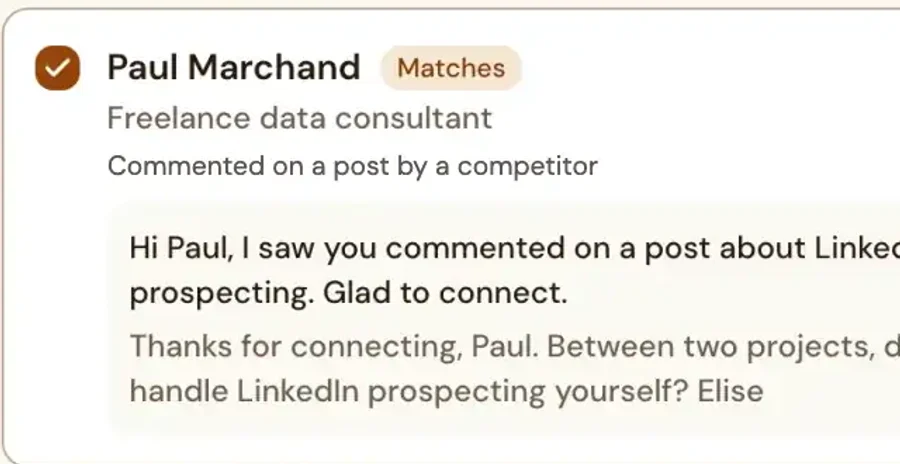
Thanks for connecting, {{first name}}. I work with [role] at companies like [company] on [specific problem]. Is that something on your plate right now?

Follow-up

{{first name}}, here's [short resource] that answers [common question]. If now isn't the right time, no worries.

Go further

Guides from the blog.

Ready to fill your pipeline?

14 days free, no credit card.

14-day free trial

FAQ

You have questions, we have answers.

Something else? Email us at [email protected]

How much time does it take each week?

Setup takes five minutes. After that, plan on the time it takes to reply to interested people, nothing more.

Do I need Sales Navigator?

No. ICP Finder and regular LinkedIn search are enough to get started.

Is my LinkedIn account at risk?

No tool can promise zero risk. Daily caps, time slots and variable delays keep the pace close to your own.

How much does Sales Farmer cost?

$15 a month, or $149 a year, with a 14-day trial and no credit card.

Home›Solutions›Real estate agents
For real estate agents

Find your next sellers, not just more contacts.

LinkedIn is full of homeowners, fellow agents and past clients. Sales Farmer automates outreach while you're at showings and appointments.

In short

On LinkedIn, a real estate agent doesn't go after "homeowners" at random. There are three audiences the platform lets you identify: professionals relocating into or out of your market, local business owners and independent professionals, and referral partners who hear about moves before anyone else, like closing attorneys, financial advisors and mortgage brokers. Twenty invitations a day at most and one local post a week are enough to turn it into a steady source of appointments.

★★★★★ 45+ solopreneurs on board
Use cases

Built around the way you prospect.

Spot homeowners who are thinking about selling

Target by area, by job title or by life change, like a relocation or a retirement. Those are often the signs that come before a listing.

Reach past clients at the right time

Three to five years after a purchase, many of them start looking again. A low-key, personal follow-up lands right when it matters.

Farm a neighborhood or a whole city

Set up a campaign once and let it run. Your time goes to appointments, not to hunting for contacts.

How it works

Three steps, that's it.

1Step 1

Define your market

Location, job title or career situation: Sales Farmer finds the matching LinkedIn profiles.

2Step 2

Let prospecting run

Invitations and follow-up messages go out on their own, in your tone and your words.

3Step 3

Handle only the replies

You see who replied and you answer yourself. The tool handles the volume, you keep the relationship.

Who to target on LinkedIn to win listings

TargetWhy they matterWhat they can bring you
Professionals moving into your marketA relocation often means a home search here, and a sale somewhere elseBuyers, renters, sometimes a referral to pass on to another agent
Professionals leaving your marketAn announced move often comes before a listingSeller listings
Local business owners and independent professionalsWealth, primary home, rental investments, office spaceListings, investment deals, commercial real estate
Referral partners: closing attorneys, financial advisors, mortgage brokersThey see estates, divorces and purchase plans come throughSteady referrals, both ways
Your past clientsThey know you, and the next move always comes eventuallyA new deal, or a referral
Sample messages

Copy them, then make them yours.

Invitation note, someone moving in

Hi {{first name}}, I saw you're moving to [city]. I've been a real estate agent here for [number] years. Happy to connect if I can be of help.

First message

Thanks for connecting, {{first name}}. When people move to [city], the real question is usually the neighborhood: [neighborhood A] for [perk], [neighborhood B] for [perk]. Are you looking to buy, or to rent while you settle in?

Helpful follow-up

{{first name}}, I have a one-page guide to the neighborhoods of [city]: schools, commute times to [job hub], the feel of each area. Want me to send it over?

Go further

Guides from the blog.

Ready to fill your pipeline?

14 days free, no credit card.

14-day free trial

FAQ

You have questions, we have answers.

Something else? Email us at [email protected]

Is LinkedIn useful for a real estate agent?

Yes, for reaching people you can identify by job and city: professionals moving in or out, business owners and independent professionals, and referral partners like closing attorneys, financial advisors and mortgage brokers. It adds to your local network and your time in the field. It doesn't replace them.

How do you get listings from LinkedIn?

Target the situations that come before a sale (a move out of the area, a retirement, a change in someone's finances), build relationships with referral partners, and stay visible in your market with one post a week.

Do I need Sales Navigator for real estate prospecting?

Not to start. Free search with a location filter is enough for a local target. Sales Navigator becomes useful for filtering recent job changes.

How many invitations should I send per day?

Start at 5 per business day and work up gradually to about 20, only if your acceptance rate holds steady. User reports put the limit at around 100 invitations a week.

Can I prospect private individuals on LinkedIn?

Yes, as long as you follow privacy rules: introduce yourself clearly, only message people your message is relevant to, and remove anyone who asks not to be contacted, no questions asked.

How much does Sales Farmer cost for a real estate agent?

The Starter plan costs $15 a month with every feature included, and a 14-day trial with no credit card.

Home›Solutions›Agencies
For agencies

LinkedIn prospecting for all your clients, in one place.

The Team plan puts your team's LinkedIn accounts on a single invoice, with one campaign and one set of tracking per client.

In short

An agency that prospects on LinkedIn for its clients needs three things: one campaign per client, simple numbers to show, and a tool the team picks up fast. With Sales Farmer, every LinkedIn account that prospects gets its own Team seat, all on one invoice, and every campaign shows its acceptance rate and reply rate.

★★★★★ 45+ solopreneurs on board
Use cases

Built for handling multiple clients.

Every client gets its own campaign

Each client keeps its own targeting, messages and tracking. Audiences never mix.

Prove ROI without spending hours on it

Acceptance and reply rates are tracked campaign by campaign, enough to feed client reporting without rebuilding a spreadsheet.

Onboard a client in minutes

No heavy technical setup: define the target, duplicate a sequence that worked, launch.

How it works

Three steps, that's it.

1Step 1

Add your team

One seat per LinkedIn account that prospects, on a single invoice.

2Step 2

Launch one campaign per client

Each campaign keeps its own targeting and its own messages.

3Step 3

Track and report

Acceptance rate, reply rate and lead volume, ready for the client meeting.

How an agency organizes prospecting for its clients

NeedIn Sales Farmer
Keep clients separateOne campaign per client, with its own targeting and messages
Report backAcceptance and reply rates per campaign
Save timeDuplicate a sequence that worked
Simple billing$19 per seat per month, a single invoice
Go further

Guides from the blog.

Ready to onboard your first client?

14 days free, no credit card.

14-day free trial

FAQ

You have questions, we have answers.

Something else? Email us at [email protected]

Can I manage multiple clients?

Yes, one campaign per client. Each LinkedIn account that prospects needs its own seat.

How do I show results to the client?

Each campaign shows its acceptance rate, its reply rate and the list of people who replied.

How much does a seat cost?

$19 a month, or $189 a year.

Home›Solutions›Sales teams
For sales teams

A tool your whole team can learn in one morning.

Your reps don't need one more piece of software to learn. They need their invitations and follow-ups to go out without having to think about it.

In short

A sales team gets more out of a shared LinkedIn prospecting tool when each rep keeps their own account and their own messages. Sales Farmer is sold by the seat, takes one morning to learn, and never follows up with a prospect who has already replied.

★★★★★ 45+ solopreneurs on board
Use cases

Built for prospecting as a team.

Everyone keeps their own account

Each rep prospects from their own LinkedIn profile, with their own messages and replies.

What works gets shared

The sequence that gets replies can be duplicated from one campaign to the next.

A predictable cost

$19 per seat per month, one invoice, and seats you can reassign.

How it works

Three steps, that's it.

1Step 1

Buy your seats

From the Team workspace, in a few clicks.

2Step 2

Invite your reps

By email. Each rep connects their LinkedIn account with the extension.

3Step 3

Track the campaigns

Each rep sees their acceptance and reply rates, campaign by campaign.

What the team gets out of it

BeforeWith Sales Farmer
Everyone prospects their own waySequences that work get shared
Forgotten follow-upsAutomatic follow-ups, stopped on reply
No visibilityAcceptance and reply rates per campaign
Expensive licenses$19 per seat per month
Go further

Guides from the blog.

Ready to equip your team?

14 days free, no credit card.

14-day free trial

FAQ

You have questions, we have answers.

Something else? Email us at [email protected]

Does each rep keep their own LinkedIn account?

Yes. Each rep connects their profile with the extension and runs their own campaigns.

How do I add a rep?

From the Team workspace, by email. Seats can be reassigned at any time.

How much does the Team plan cost?

$19 per seat per month, or $189 a year.

Pricing

Find the right plan.

Start for free, build your campaign, and move to Team as you grow. Prices shown in US dollars, excluding tax.

Starter

Everything you need to generate sales.

$15per month, everything included
Save $50 a month on average
  • Unlimited extraction from LinkedIn and Sales Navigator
  • Filter for profiles active on LinkedIn in the last 30 days
  • Unlimited, personalized campaigns
  • ICP Finder: your ideal customer in 3 steps
  • Unlimited personalized messages
  • Campaign tracking and performance analytics
  • Customer support by email and chat
  • No commitment
Prospect for free for 14 days
No credit card requiredNo commitment

Team

For several sales reps, on a single invoice.

$19per seat per month
  • Several LinkedIn accounts, one team
  • Central management of your team's accounts
  • One invoice for the whole team
  • Everything in the Starter plan

Create your account, then pick Team from your dashboard.

Set up my team
In the app

Switch plans in two clicks.

  • Monthly or yearlyYearly works out to $12.42 a month, 17% less.
  • Solo or teamMove to Team when a second sales rep joins.
  • No commitmentYou cancel from the same page.
The comparison

Why pay more to do the same?

Say goodbye to overpriced tools and get started in 5 minutes flat.

Sales Farmer compared with the usual LinkedIn automation tools
Tools better left unnamed…Sales Farmer
Price$50 to $150 per month$15 per month, 70% cheaper
Getting startedSeveral days of tutorialsReady in 5 minutes flat
FeaturesLots of them, often uselessFocused on what works
AutomationComplex workflows to piece togetherOne sequence to personalize
LinkedIn accountPace often too aggressiveAdjustable caps, hours and breaks
Try it free and see the difference
No credit card requiredNo commitment
Do prices include tax?

No. Prices are shown in US dollars, excluding tax. Any applicable tax is added based on your country and status.

What happens when the trial ends?

Your campaigns pause. Pick a plan and they pick up right where they left off. Nothing gets charged without your consent, since the trial doesn't ask for a card.

Can I switch plans along the way?

Yes. You move from Starter to Team inside the app, and you can change the number of seats at any time.

Why is the price so low?

Because the tool does one thing. A single, well-tuned automation costs less to run than a suite of fifty features.

Home›Blog
The farm blog

Learn to sow better.

Sourced, dated guides on LinkedIn prospecting. Every article cites its numbers and says where they come from. Written by John the Farmer.

14 articles

Home›Blog›

More in this category
14-day free trial
Home›Resources›LinkedIn limits
Resource

LinkedIn limits in 2026, by account type.

LinkedIn does not publish official numbers. These benchmarks are what the app shows its users, observed on real accounts. They vary with the age and activity of the account.

Usage benchmarks by LinkedIn account type, 2026
FreePremiumSales Navigator
Invitations per weekAbout 120, 100 recommendedAbout 120, 100 recommended150 to 250
Invitations per dayAbout 20About 2030 to 50
Messages per weekAbout 100About 150About 150
Profiles viewed per dayAbout 80100 to 150Up to 1,000
Connections30,000 maximum
What triggers a restriction

LinkedIn watches three things.

Volume in a short window

A hundred invitations in one hour stand out far more than a hundred spread over a week.

Ignored invitations

A pile of pending invitations, or invitations marked as unwanted, weighs heavily. LinkedIn reads it as poor targeting, whatever your volume.

Rhythm

Actions at perfectly regular intervals look like a bot. Varied delays look like a person.

Setting up Sales Farmer

The settings we recommend.

  • New or barely active account20 invitations a day for the first two weeks, then 40.
  • Established account40 invitations and 50 messages a day, on weekdays.
  • Delay between tasks2 minutes. Going shorter gains you very little.
  • Pending invitationsWithdraw any older than three weeks.

Sources and method: our article "LinkedIn limits 2026: automate without the risk" and LinkedIn Help on invitation restrictions.

Home›Affiliates
Affiliate program

30% commission, for life.

Do you talk about prospecting, LinkedIn or tools for freelancers? Recommend Sales Farmer. You earn 30% of every payment your referrals make, for as long as they stay subscribed.

Calculator
$225per month, on the $15 plan

Formula: referrals × $15 × 30%. Before tax. An estimate, not a promise of income.

How it works

Three steps, no paperwork.

1

Sign up

The form takes two minutes. You get your personal link.

2

Share your link

In an article, a video, a newsletter or a LinkedIn post.

3

Earn 30%

On every payment your referrals make, for life. Paid monthly, no minimum payout.

Who it's for

People who already have an audience.

  • Content creatorsCovering sales, LinkedIn, freelancing or no-code tools.
  • Consultants and trainersWho recommend tools to their clients and students.
  • AgenciesThat set up tools for their clients and want extra recurring revenue.
When do I get paid?

Every month, for the payments collected the month before.

Is there a minimum payout?

No. You get paid from your first referral.

How much do I earn per referral?

30% of what they pay: $4.50 a month on the Starter plan, for as long as they stay subscribed.

The simplest way to succeed. Use the tool before you recommend it. An honest demo converts better than a feature list.
Home›About
Our mission

Effective prospecting shouldn't be a luxury.

Technology should be within everyone's reach. Software keeps a business running, and it's unfair that it stays out of reach for most people. Sales Farmer exists so you can keep doing what you love and keep offering your services to your community without going broke.

Where the name comes from

Prospecting is farming.

You prepare the soil, sow, let it grow, then gather what took. Nobody expects a harvest the day after planting. LinkedIn prospecting runs on the same calendar: a campaign needs a few days for its first replies and a few weeks to show what it can do.

A farmer plows better with the right tools. So does a freelancer. We built ours like a farm tool: sturdy, simple, and sold at the price of a tool.

Our principles

Simple. Affordable. Built for you.

One automation, done right

Invitation, message, follow-ups, stop on reply. We add a feature when almost everyone needs it, never to pad a pricing page.

A price that doesn't creep up

$15 a month, everything included. No credits to top up, no basic feature locked behind a higher plan.

Your account comes before our numbers

Cautious settings by default, and no promise of zero risk. A restricted account does nobody any good.

What we refuse to do

Three things you won't see here.

Made-up numbers

The rates shown on this site come from demo campaigns, and we say so. The benchmarks on the blog cite their sources.

Twenty-step workflows

If you need them, other tools do that very well. We're not chasing them.

Bot-run support

A real person answers, by email or chat, and helps you set up your first campaign.

+45 solopreneurs on board
14guides published
on the blog
5 minto launch
a campaign
30%paid to affiliates
for life

Sales Farmer in the press

Home›Legal
Home›Legal
Home›Contact
Contact

Got a question? Write to us.

A real person will reply, usually within 24 hours. You can also email us directly at [email protected].

★★★★★ +45 solopreneurs on board

Plant this week. Harvest the next.

Nobody harvests the day after planting. A campaign launched today brings its first replies within a few days and its real results within a few weeks.

Prospect for free for 14 days
No credit card requiredNo commitment