

LinkedIn prospecting for all your clients, in one place.
The Team plan puts your team's LinkedIn accounts on a single invoice, with one campaign and one set of tracking per client.


 +45 solopreneurs on board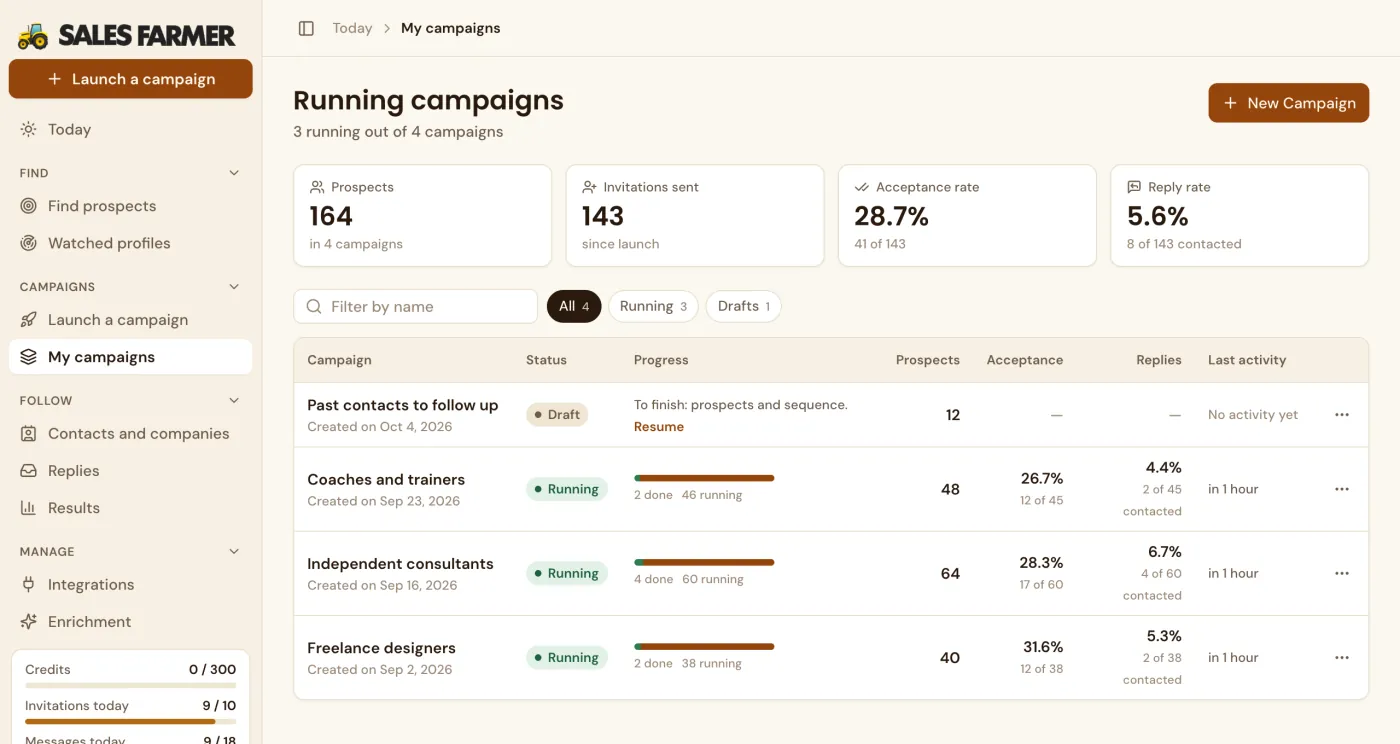
An agency that prospects on LinkedIn for its clients needs three things: one campaign per client, simple numbers to show, and a tool the team picks up fast. With Sales Farmer, every LinkedIn account that prospects gets its own Team seat, all on one invoice, and every campaign shows its acceptance rate and reply rate.
How do you manage LinkedIn prospecting for several clients?
Create one campaign per client, with its own target, sequence and tracking. Sales Farmer keeps each campaign's results separate and bills on one invoice. Each LinkedIn account has its own limits. The Growth plan runs up to 3 LinkedIn accounts in parallel.
Updated
Built for handling multiple clients.
Every client gets its own campaign
Each client keeps its own targeting, messages and tracking. The lists of people never mix.
Prove ROI without spending hours on it
Acceptance and reply rates are tracked campaign by campaign, enough to feed client reporting without rebuilding a spreadsheet.
Onboard a client in minutes
No heavy technical setup: choose the client's prospects, write the sequence, launch.
Three steps, that's it.
Add your team
One seat per LinkedIn account that prospects, on a single invoice.
Launch one campaign per client
Each campaign keeps its own targeting and its own messages. In Manual mode, you can also duplicate a sequence that worked.
Track and report
Each campaign shows its funnel: invitations accepted, replies and meetings, ready for the client meeting.

Paste your website address. Sign-up picks it up for you.
How an agency organizes prospecting for its clients
| Need | In Sales Farmer |
|---|---|
| Keep clients separate | One campaign per client, with its own targeting and messages |
| Report back | Acceptance and reply rates per campaign |
| Save time | Duplicate a sequence that worked |
| Simple billing | $19 per seat per month, a single invoice |
Guides from the blog.
LinkedIn Follow-Up Messages: Timing and 12 Templates
When to follow up on LinkedIn, how many times, and 12 templates to copy for each situation: silence, interest that faded, after a call.
Read the guide →LinkedIn Acceptance and Reply Rates: 2026 Benchmarks
How to calculate your LinkedIn acceptance and reply rates, what 2026 benchmarks say is normal, and what to fix when a campaign underperforms.
Read the guide →LinkedIn Prospecting Message Templates (2026)
LinkedIn prospecting templates by job, a full sequence from invitation to closing message, and what to personalize in each one so it never sounds…
Read the guide →Can I manage multiple clients?
Yes, one campaign per client. Each LinkedIn account that prospects needs its own seat.
How do I show results to the client?
Each campaign has its funnel by step: acceptances, replies and meetings, with the list of people who replied.
How much does a seat cost?
$19 a month, or $189 a year.